Showing posts with label reboot. Show all posts

HOW-TO: Add LUNs to a Linux Host Without Reboot

Abstraction between the operating system and the hardware is key to being able to modify running systems without having to reboot. Reboot is often associated with the dreaded word "downtime". This short downtime could cost some hundreds of dollars while for some, it could be in the magnitude of hundreds of thousands of dollars.

One of the major reasons for downtime is adding hardware to the host. And, more often than not, it is storage that is being added. Abstraction between the operating system and the hardware layer is key to planning and playing it out without causing or even costing the company downtime.

On the hardware layer, adding LUNs is a simple introduction or mapping of the drive to the host. This is the conventional way of doing it. Sad thing, however, it doesn't always work.

By conventional, I mean this method of rescanning the SCSI bus for a particular host.
echo "- - -" > /sys/class/scsi_host/host0/scan
The triple dashes "- - -" are wildcards that rescan every channel, every target, and every LUN on the specificed SCSI host. The above command scans the SCSI bus for new devices and map those drives to new device nodes that could be used by the Linux host. This works about 60-70% of the time. For the remaining 30-40%, I follow a better route that has flawlessly worked for me so far.

The utility or tool I use doesn't get installed by default. It is imperative that you have the original installation media or an internet connection for this to work.

For RHEL, Fedora and CentOS hosts, the command to run is:
yum -y install sg3_utils
The above command will likewise install dependent packages that it requires. The sg3_utils package contains a script named rescan-scsi-bus.sh. This is what is needed for the addition of LUNs or drives.

To detect or rescan new devices, invoke the script via "rescan-scsi-bus.sh -l". For SAN LUNs, what I found to have worked perfectly is "rescan-scsi-bus.sh --forcerescan". To get colored output the addition of "--color" makes all that possible.

This works for me whether the host is bare-metal or virtual.

RedHat warns about caveats for using sg3_utils scripts.
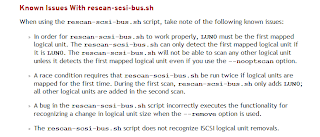
SG3 Known Issues

So far this tool has helped me avoid reboots and incurring the corresponding downtime. I hope it helps you as well.

Share:

HOW-TO: Kill Zombie Processes with Parent ID (PID) of 1

As a system administrator, we are often briefed on the careful use of the "kill" command. Indeed to use this command, you need to know what you're doing.. you really really need to know what you're doing. Seasoned system administrators would often talk about the first time they used this command and the racing heart rate before hitting the execute key.

It's not that bad though. Like all critical things this command could be the "last-resort" tool you need to resolve a complex issue -- in case of fire break glass thing, sort of. But the "kill" command doesn't always work. I'd say about 99% of the time it will. You need to be a seasoned system administrator long enough to encounter this problem as it doesn't come along very often.

I decided to post this solution since last week, I encountered a runaway samba (smbd) process. Samba had to be stopped but instead of it gracefully shutting down, only the parent process did and left behind a lot of child processes. They in turn became zombie processes -- about 257 of them.

It would not have mattered much, but the load on the server increased to match the number of zombie processes. In a matter of seconds, it became a critical problem that need to be dealt with. To illustrate the criticality of the situation, here are a couple of indicators.

[root@vhost ~]# ps -ef | grep smbd | wc -l
257
[root@vhost ~]# uptime
15:18:09 up 95 days,  5:04,  6 users,  load average: 257.91, 257.98, 255.54

When ps is executed, it returned smbd processes that had a parent ID (PID) of 1 -- zombie processes.

[root@vhost ~]# ps -ef | grep smb | tail
nobody   31590     1  0 12:29 ?        00:00:00 smbd -D
nobody   31705     1  0 11:55 ?        00:00:00 smbd -D
nobody   31743     1  0 14:31 ?        00:00:00 smbd -D
nobody   32049     1  0 12:19 ?        00:00:00 smbd -D
nobody   32415     1  0 12:04 ?        00:00:00 smbd -D
nobody   32484     1  0 14:25 ?        00:00:00 smbd -D
nobody   32508     1  0 13:35 ?        00:00:00 smbd -D
nobody   32511     1  0 12:04 ?        00:00:00 smbd -D
nobody   32535     1  0 13:22 ?        00:00:00 smbd -D
nobody   31599     1  0 11:51 ?        00:00:00 smbd -D
[root@vhost ~]# kill -9 31599

Killing any of the smbd processes didn't do much. Server load is holding steady at 257 and none of the smbd processes get terminated.

Once a process becomes a zombie process (or with a PID of 1), there is no amount of "kill" that could terminate it. The only other known way to terminate the zombie process is to do a host reboot. You and I both know this is to be avoided as much as possible.

The other way to do it is not known to many. Only a handful of system administrators that I personally know, knew how to use this command. The command is "telinit". This is the alternative to rebooting the server. To kill the zombie process(es) or processes with PID of 1, execute "telinit u" or "telinit U". Executing the command "telinit u" makes init (the process with ID 1) restart, or as the man pages state it, re-execute, without having to reboot the host.

Once this was done, an immediate impact of decrease in server load was felt. Also, the smbd processes that used to be zombies are now gone.

[root@vhost ~]# uptime
15:21:22 up 95 days,  5:07,  6 users,  load average: 49.06, 184.80, 229.74

About 5 minutes after execution of telinit. The load has re-stabilized.

So if a fellow administrator asks you if you know how to kill a zombie process, let them know that you belong to those handful of seasoned system administrators who don't consider reboot a solution to terminate a zombie process.

I have asked this question in several interviews so far only a few got it right. And I consider it major point in hiring.


Share:

Subscribe for Latest Update

Popular Posts

Post Labels

100gb (1) acceleration (1) acrobat (1) adblock (1) advanced (1) ahci (1) airdrop (2) aix (14) angry birds (1) article (21) aster (1) audiodg.exe (1) automatic (2) autorun.inf (1) bartpe (1) battery (2) bigboss (1) binance (1) biometrics (1) bitcoin (3) blackberry (1) book (1) boot-repair (2) calendar (1) ccleaner (3) chrome (5) cloud (1) cluster (1) compatibility (3) CPAN (1) crypto (3) cydia (1) data (3) ddos (1) disable (1) discount (1) DLNA (1) dmidecode (1) dns (7) dracut (1) driver (1) error (10) esxi5 (2) excel (1) facebook (1) faq (36) faucet (1) firefox (17) firewall (2) flash (5) free (3) fun (1) gadgets (4) games (1) garmin (5) gmail (3) google (4) google+ (2) gps (5) grub (2) guide (1) hardware (6) how (1) how-to (45) huawei (1) icloud (1) info (4) iphone (7) IPMP (2) IPV6 (1) iscsi (1) jailbreak (1) java (3) kodi (1) linux (28) locate (1) lshw (1) luci (1) mafia wars (1) malware (1) mapsource (1) memory (2) mikrotik (5) missing (1) mods (10) mouse (1) multipath (1) multitasking (1) NAT (1) netapp (1) nouveau (1) nvidia (1) osmc (1) outlook (2) p2v (2) patch (1) performance (19) perl (1) philippines (1) php (1) pimp-my-rig (9) pldthomedsl (1) plugin (1) popcorn hour (10) power shell (1) process (1) proxy (2) pyspark (1) python (13) qos (1) raspberry pi (7) readyboost (2) reboot (2) recall (1) recovery mode (1) registry (2) rename (1) repository (1) rescue mode (1) review (15) right-click (1) RSS (2) s3cmd (1) salary (1) sanity check (1) security (15) sendmail (1) sickgear (3) software (10) solaris (17) squid (3) SSD (3) SSH (9) swap (1) tip (4) tips (42) top list (3) torrent (5) transmission (1) treewalk (2) tunnel (1) tweak (4) tweaks (41) ubuntu (4) udemy (6) unknown device (1) updates (12) upgrade (1) usb (12) utf8 (1) utility (2) V2V (1) virtual machine (4) VirtualBox (1) vmware (14) vsphere (1) wannacry (1) wifi (4) windows (54) winpe (2) xymon (1) yum (1) zombie (1)

RANDOM POSTS