Showing posts with label chrome. Show all posts

HOW-TO: Disabling Built-in Flash Player in Google Chrome

One of the biggest reasons I use Google's Chrome browser is the innate capability to translate content that is posted in a foreign language. This comes built into the browser itself and you don't have to do anything after installation. No other browser has this capability, to date.

Another reason, is Google Chrome is more secure than other browsers with its sandbox environment and what nots. Although this is subject to debate, I find this acceptable as it is and with that in mind, I use Chrome most of the time. There are still other functionality I find Mozilla's Firefox is better at, especially now that version 7 has better memory management.

While all these built-in functionality is great, there are exceptions to the rule. What am I pointing to? It is the Flash Player that is built-into Google Chrome. Did you know that Flash Player updates are included in Chrome system updates? Believe it.

That may not be a bad thing in itself, you may want to have control over how your browser behaves. And since you probably don't let Chrome monopolize your browsing behavior and we don't know which Flash Player takes priority and precedence, we can disable the built-in Flash Player and let the installed Flash Player take over.

Launch Google Chrome and type "about:plugins" (or "chrome://plugins") to the address bar. On the upper right you can click on the "plus" sign next to Details. This opens the plug-ins installed on the browser.

On my Chrome, I have 3 versions of Flash Player installed. And below is the screenshot of that.

Disabling Built-in Flash Player in Google Chrome

You can also see the versions of Flash Player plug-ins installed on the browser. And from the screenshot below you can see those information. From here, you can enable or disable the Flash Player plug-ins.
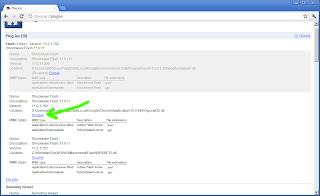
Disabling Built-in Flash Player in Google Chrome

I tend to think that the order in which the Flash Player plug-ins appear also indicates precedence but this is not confirmed. It is just a hunch. So there you go folks, disabling the built-in Flash Player in Google Chrome.

Share:

INFO: Intelligence Quotient (IQ) Linked to Browser Usage

Do you use Internet Explorer (or IE) in browsing the web? IE is to browsers as Windows is to the desktop. Although many would tend to disagree with that statement, it still stands as a fact. Surprisingly, browser usage is related to your intelligence quotient, or IQ.
A Vancouver based Psychometric Consulting company, AptiQuant, has released a report on a trial it conducted to measure the effects of cognitive ability on the choice of web browser. AptiQuant offered free online IQ tests to over a 100,000 people and then plotted the average IQ scores based on the browser on which the test was taken. And the results are really not that surprising. With just a look at the graphs in the report, it comes out pretty clear that Internet Explorer users scored lower than average on the IQ tests. Chrome, Firefox and Safari users had just a teeny bit higher than average IQ scores. And users of Camino, Opera and IE with Chrome Frame had exceptionally higher IQ levels.

Internet Explorer has traditionally been considered a pain in the back for web developers. Any IT company involved in web development will acknowledge the fact that millions of man hours are wasted each year to make otherwise perfectly functional websites work in Internet Explorer, because of its lack of compatibility with web standards. The continuous use of older versions of IE by millions of people around the world has often haunted web developers. This trend not only makes their job tougher, but has also pulled back innovation by at least a decade. But with the results of this study, IT companies worldwide will start to take a new look on the time and money they spend on supporting older browsers.

Microsoft created a conspiracy with Internet Explorer’s shell integration with Windows Explorer, and making its removal complicated, if not impossible. It is usually criticized that this move was made during the last moments of Windows 95 release in a haphazard manner, just to snub the competition from Netscape Navigator. In the following years Microsoft spent millions of dollars on Internet Explorer, with the aim to dominate the browser market. It succeeded to gain a huge share of over 95% for quite a few years. But recently open source browsers like Mozilla Firefox and Google Chrome have taken away a large share out of Microsoft’s pie. These browsers are not only better in performance than IE, but offer better compatibility with W3C standards.

This latest report about the intelligence levels of IE users is expected to create a storm. The company behind the study, AptiQuant is a psychometric consulting company, that offers online tools to other companies to better assess their existing/potential employees based on their mental aptitude, skills, motivation and performance. It also has self-serving tools for individuals looking to identify their skills and reach their potential.

(source: http://goo.gl/FbELp)

I never really thought that a simple computer software like the browser can relate to the intelligence quotient (IQ) of an individual. What do you think?

To view the full content of the report, you can download the Intelligence Quotient (IQ) and Browser Usage PDF file here.

IQ Linked to Browser Usage

IQ Linked to Browser Usage

(image source: http://www.aptiquant.com/IQ-Browser-AptiQuant-2011.pdf)

Share:

TIP: Test Your Browser's Functionality, Security and More

With the advent of HTML5, websites are presented to the end-user in a different light. What used to be flash dominated content are now CSS3 and javascript dominated. The development of jQuery library and javascript based modules and plug-ins present a different facet of webpage programming. What used to be javascript geeks are now known as javascript ninjas.

The HTML5 standard showed an advanced way of programming and at the same time required a little more from our browsers. Tied with these features are support requirements for different functions. Website gurus and javascript ninjas should ensure that their pages load in the same manner across different browsers. At the same time users with different browsers are able to view the same website without having to open another compatible browser. This cuts both ways.

New browsers present new bugs -- added functionality that may not work as it should. Security should also be taken into consideration with the added functionality. So how do programmers, developers and end-users alike test their browser's functionality and security? The site browserscope seem to have the answer.

Browserscope tests the functionality of today's modern browsers but doesn't leave security behind. This tool is really useful.

So before making a recommendation, we took it out for a spin with the favorite browsers of this generation. If you want to try it out for yourself, launch your favorite browser and point it to this URL: http://www.browserscope.org/alltests.

Google Chrome. This is version 12.0.742.122 of Google Chrome.
Test Your Browser's Functionality, Security and More

Test Your Browser's Functionality, Security and More

Mozilla Firefox. Current production release version 5.0.1.

Test Your Browser's Functionality, Security and More

Test Your Browser's Functionality, Security and More

We didn't really need to do much comparison as browserscope already has a database of browsers with which to compare your browser. But we were curious as to where our browser stands in comparison. From the results, it looks like Google's Chrome browser has the edge in all browsers.

Share:

INFO: Install Angry Birds on Chrome Browser

The game popularized by its presence on most mobile devices and a recent animation movie -- Angry Birds (by Rovio) -- is now on the Google Chrome browser. And you don't have to pay for it. It's absolutely free!

To install, browse to the chrome web store > Apps > Games > Angry Birds and toward the right side there will be an Install button. Click it and install.

Angry Birds on Chrome Browser

WARNING: You can get hooked with Angry Birds. And it will eat a lot of your time. So don't say we didn't warn you.

To play the game, just open a new tab and the Angry Birds icon will be on the top layer under the Apps header. Or input http://chrome.angrybirds.com/on the address bar.

Angry Birds on Chrome Browser

Enjoy the Angry Birds game for free on your Chrome browser.

Share:

TWEAK: English as Default Google Search Language

Nowadays it is unusual to encounter folks who don't know google. Google has branded itself with search engines that browsers come with google as the default out-of-the-box search engine. More often that not, the term search is replaced by "google".

However, google's top-secret algorithm and architechture sometimes fouls up that even if your browser's default language is English, it returns searches in the local language of the geographically nearest google server -- google.com.ph, google.com.hk, etc (you get the idea). And when you get redirected, the language is no longer English. How then do you google that results always return in English?

Let us split the discussion to two popular browsers -- firefox and google chrome. Both of this browsers exhibit this behavior, as per experience.

Firefox. For firefox, you may download the Google (in English) add-on.

[1] Launch the link for "Google (in English)" add-on above or click here.

[2] Once the webpage loads, click on the "Add to Firefox" link and allow the website to install the add-on. Restart firefox if asked to do so.

[3] Once installed, you may select from the drop down of the search bar (to the right of the address bar) "Google (in English)" as the default search engine (see snapshot below).

English as Default Google Search Language


Your searches should now always return in the English language.

Google Chrome. For Chrome, follow the procedure below.

[1] Right-click on the address bar. Select "Edit search engines..".

[2] Toward the bottom of the page are three blank fields. On the first field (containing: Add a new search engine) type "Google (in English)" or whatever makes you happy. This contains an arbitrary name of the custom search engine.

[3] On the second field (containing: Keyword), you can input anything or leave this space blank. In this example, the keyword used is "google.com".

[4] The last field (containing: URL with %s in place of query), key in:
http://www.google.com/search?q=%s

[5] The search engine you just added moves to the top half of the screen (Default search options). You can mouse over the added search engine and click on "Make default". The label "Google (in English)" then becomes bold when it becomes the default search engine.

English as Default Google Search Language


From the above screenshot, my google search engine takes me to Hong Kong (google.com.hk) and some results return in the Chinese language. And unfortunately, I don't speak any Chinese at all.

There you go folks. Google search that returns results in the English language.

Share:

Subscribe for Latest Update

Popular Posts

Post Labels

100gb (1) acceleration (1) acrobat (1) adblock (1) advanced (1) ahci (1) airdrop (2) aix (14) angry birds (1) article (21) aster (1) audiodg.exe (1) automatic (2) autorun.inf (1) bartpe (1) battery (2) bigboss (1) binance (1) biometrics (1) bitcoin (3) blackberry (1) book (1) boot-repair (2) calendar (1) ccleaner (3) chrome (5) cloud (1) cluster (1) compatibility (3) CPAN (1) crypto (3) cydia (1) data (3) ddos (1) disable (1) discount (1) DLNA (1) dmidecode (1) dns (7) dracut (1) driver (1) error (10) esxi5 (2) excel (1) facebook (1) faq (36) faucet (1) firefox (17) firewall (2) flash (5) free (3) fun (1) gadgets (4) games (1) garmin (5) gmail (3) google (4) google+ (2) gps (5) grub (2) guide (1) hardware (6) how (1) how-to (45) huawei (1) icloud (1) info (4) iphone (7) IPMP (2) IPV6 (1) iscsi (1) jailbreak (1) java (3) kodi (1) linux (28) locate (1) lshw (1) luci (1) mafia wars (1) malware (1) mapsource (1) memory (2) mikrotik (5) missing (1) mods (10) mouse (1) multipath (1) multitasking (1) NAT (1) netapp (1) nouveau (1) nvidia (1) osmc (1) outlook (2) p2v (2) patch (1) performance (19) perl (1) philippines (1) php (1) pimp-my-rig (9) pldthomedsl (1) plugin (1) popcorn hour (10) power shell (1) process (1) proxy (2) pyspark (1) python (13) qos (1) raspberry pi (7) readyboost (2) reboot (2) recall (1) recovery mode (1) registry (2) rename (1) repository (1) rescue mode (1) review (15) right-click (1) RSS (2) s3cmd (1) salary (1) sanity check (1) security (15) sendmail (1) sickgear (3) software (10) solaris (17) squid (3) SSD (3) SSH (9) swap (1) tip (4) tips (42) top list (3) torrent (5) transmission (1) treewalk (2) tunnel (1) tweak (4) tweaks (41) ubuntu (4) udemy (6) unknown device (1) updates (12) upgrade (1) usb (12) utf8 (1) utility (2) V2V (1) virtual machine (4) VirtualBox (1) vmware (14) vsphere (1) wannacry (1) wifi (4) windows (54) winpe (2) xymon (1) yum (1) zombie (1)

RANDOM POSTS