Showing posts with label free. Show all posts

TIP: 100 Gigabytes of Cloud Storage for Free

Have you recently had a drive failure? How painful was it to lose files? How about pictures, or should I say memories of you and your loved ones frozen in time and preserved by digital means? It is a tough pill to swallow, don't you agree? If you knew of a simple way to preserve them, would you turn back time to do this? I would. And, I will suggest a means to do it.

This "means" can be installed to preserve digital memories as it works on both your notebook and your mobile device (tablet or phone). This "means" that I'm mentioning is Degoo. Its initial offering is 100GB and it could expand to as much as 600GB of cloud storage. The best part of it is, the service is provided for FREE!

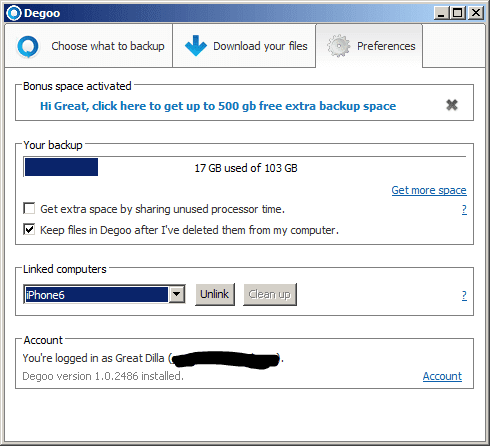
This is how it looks on my notebook.
Degoo Settings (Windows)

As you can see from the interface below, the restore can be initiated by downloading the individual file -- restores can be done at file level. You may also choose folders to backup. The default cycle is set to monthly frequency. Manual override is available so if you want to execute a backup on-demand, it is just one click away.

The caveat I'm seeing (and shown on the screenshot below), is that the filename of the photo is derived from the datestamp of when it was taken. This happens if I want to restore photos on my notebook, instead of the phone.

Degoo Recovery (Windows)

As mentioned, it is available for phones. I have tested the iOS version, and the interface screenshot is below. The restore interface has thumbnails of the images this time, not just the filenames of the photos. It is much easier to restore the particular photo you need, given a preview.

Degoo iOS

You may set it so that, Degoo doesn't have to delete files you have removed on your notebook or phone. Also, the free service is good for two (2) devices. I have tried it with three (3) and the third one added failed to execute the back-up.

 RELATED: Huge Discounts on Python Courses at Udemy

The initial 100GB may not be much. But if you share Degoo with your friends, you may end up with more cloud storage for your photos. You both get 3GB for every successful referral. Executing back-ups may not be worth your time now. But do you really have to wait until an unforeseen disaster strikes?

Share:

TIP: Learn Advanced Python Course for Free

There are two-things most notable about opensource software -- active development from a community of users, and, the benefit of using something that comes free. However, the learning curve varies since the actual training itself (the immersion process) comes at a price. Sometimes discounted, but still with a price tag. Like the course that got me started with Python -- Complete Python Bootcamp: from Zero to Hero. Time and time again, you will hear me say this is what I highly recommend as a starting point.

In order to advance the building of knowledge and the immersion process of using Python, load up on advanced courses. One advanced course is being offered for free in Udemy. It is the course Learn Advanced Python. I haven't taken this course yet, but I enrolled since it is being offered for free!

I have included a screenshot of what I'm seeing on screen from the link I posted above. Or simply click this thumbnail to follow the link. Go ahead as the embedded coupon code might expire soon.

Learn Advanced Python

Completing a course in Udemy, comes with a certificate that you can use for credentials. In order to whet your appetite on what to expect, below is the course description:

Python is one of the most widely used high level programming language. The language stresses on code readability and due to its syntax and implementation a programmer has to write lesser code as compared to other languages such as C++ and Java. The language supports multiple style like functional programming, object oriented or imperative style. The memory management is done automatically and has many standard libraries available for python programmer.

Learning a programming language is always an uphill ride but as luck would favor us python was designed to be easily learnt by a novice programmer. Python code is readable and with a little knowledge a developer can learn many things just by looking at the code. It executes read evaluate print loop which gives developer a chance to play around with code and experiment. Also the standard library offers you a lot of functionalities which lets you execute complex functionalities with ease.

Learning python opens up many doors for python developers in the world of programming. Python has an object oriented approach which is preferred by many leading languages such as C#, Ruby, JavaScript, Perl etc. So once you get comfortable with the concepts of python you can switch to any other object oriented language and the only thing you will have to learn is the syntax of language.

To create a product which stands out amongst the crowd, you can develop it in any language. But there are certain constraints like time and budget which can’t be overlooked. This is where the choice of language decides the fate of the project and if project is big the company also might get affected. Python is a good choice for startups as it allows quick development and the amount of code is less as compared to c, java etc. Python can scale the most complex application effortlessly and can be handled by a small team effectively. Python also has a very reliable support team to solve your queries.

A python developer can rarely get stuck as there are large number of resources available which keeps on getting updated. It has a huge standard library which provides inbuilt functionality which is why some known applications are built on Python.


 RELATED: Huge Discounts on Python Courses at Udemy

Hope this gets you going in your quest to add Python in your everyday go-to tools for the trade. Share with your friends who also want to learn and benefit from Python. If you wish to keep up to date with free and discounted Python courses by using the subscribe link in the right panel of the webpage.

Share:

INFO: Plants VS Zombies 2 FREE!

Were you addicted to "Plants vs Zombies"? Or are you aware that it even exists? If this is the first time you have heard about it, it's about time as the game is free. The game could be downloaded off the apple store for free!

The screenshot below will tell you that I'm not kidding. It is taken today off of my iPhone. It is not often that this game is offerred for free. Right now the old version of the game is not free and costs US$0.99. Not sure how much the new version will be when it sells.


The game has been installed on my iPhone (screenshot below). I haven't played it yet as I'm excited to let everyone know that the game is free.


So what are you waiting for? Download the game for free and try it out for yourself.


Share:

Subscribe for Latest Update

Popular Posts

Post Labels

100gb (1) acceleration (1) acrobat (1) adblock (1) advanced (1) ahci (1) airdrop (2) aix (14) angry birds (1) article (21) aster (1) audiodg.exe (1) automatic (2) autorun.inf (1) bartpe (1) battery (2) bigboss (1) binance (1) biometrics (1) bitcoin (3) blackberry (1) book (1) boot-repair (2) calendar (1) ccleaner (3) chrome (5) cloud (1) cluster (1) compatibility (3) CPAN (1) crypto (3) cydia (1) data (3) ddos (1) disable (1) discount (1) DLNA (1) dmidecode (1) dns (7) dracut (1) driver (1) error (10) esxi5 (2) excel (1) facebook (1) faq (36) faucet (1) firefox (17) firewall (2) flash (5) free (3) fun (1) gadgets (4) games (1) garmin (5) gmail (3) google (4) google+ (2) gps (5) grub (2) guide (1) hardware (6) how (1) how-to (45) huawei (1) icloud (1) info (4) iphone (7) IPMP (2) IPV6 (1) iscsi (1) jailbreak (1) java (3) kodi (1) linux (28) locate (1) lshw (1) luci (1) mafia wars (1) malware (1) mapsource (1) memory (2) mikrotik (5) missing (1) mods (10) mouse (1) multipath (1) multitasking (1) NAT (1) netapp (1) nouveau (1) nvidia (1) osmc (1) outlook (2) p2v (2) patch (1) performance (19) perl (1) philippines (1) php (1) pimp-my-rig (9) pldthomedsl (1) plugin (1) popcorn hour (10) power shell (1) process (1) proxy (2) pyspark (1) python (13) qos (1) raspberry pi (7) readyboost (2) reboot (2) recall (1) recovery mode (1) registry (2) rename (1) repository (1) rescue mode (1) review (15) right-click (1) RSS (2) s3cmd (1) salary (1) sanity check (1) security (15) sendmail (1) sickgear (3) software (10) solaris (17) squid (3) SSD (3) SSH (9) swap (1) tip (4) tips (42) top list (3) torrent (5) transmission (1) treewalk (2) tunnel (1) tweak (4) tweaks (41) ubuntu (4) udemy (6) unknown device (1) updates (12) upgrade (1) usb (12) utf8 (1) utility (2) V2V (1) virtual machine (4) VirtualBox (1) vmware (14) vsphere (1) wannacry (1) wifi (4) windows (54) winpe (2) xymon (1) yum (1) zombie (1)

RANDOM POSTS