Showing posts with label compatibility. Show all posts

HOW-TO: Force Addon Compatibility with Firefox (again)

The fast release of Firefox major versions every six (6) or so weeks means add-ons have to keep pace with Firefox. What's more? Security fixes will be the reason for every major release. So if you wish to remain on the previous versions, you will be stuck with an insecure browser. You wouldn't want that would you?

Previously posted at pimp-my-rig is a tutorial to force add-on compatibility with Firefox. It still works. For third party add-ons that are installed via Program Files, like DivX, here is another tweak to force compatibility with Firefox. We tested it on Firefox 6.0 and it works just as well.

All those works, why post another procedure? Well, as the saying goes "there are a thousand ways to kill a cat" -- so does this tweak. With the release of Firefox 6.0, most addons will not be compatible. The above tweaks work for a variety of addons, here is another way to force compatibility check.

Open an Explorer window and browse to "%appdata%\Mozilla\Firefox\Profiles" (this is the default directory containing your Firefox user profile). Inside this directory will be another folder named xxxxxxxx.default (xxxxxxx is a string that will differ from computer to computer); and inside this is the extensions folder, which is the directory that contains the extensions or addons you have installed (refer to screenshot below).
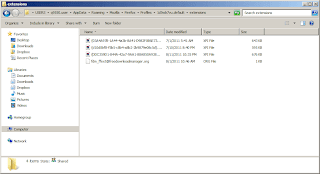
Force Addon Compatibility Firefox

WinRAR can open those XPI files in the extensions folder. Once opened, you can edit the install.rdf files inside the archive.
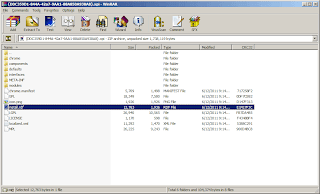
Force Addon Compatibility Firefox

Just look for the string "<em:maxVersion>" and/or "</em:maxVersion>". Enclosed in these XML tags is the maximum version of Firefox that is compatible. Change it to "6.*" or "7.*" as you wish. Then save the file and update the XPI archive.

Restart Firefox and test the functionality of the addon. As of this writing, downloadthemall is tested to work using this tweak on Firefox 6.0.

So if you need the functionality of your addon try this out.

Share:

TWEAK: Fully Functional DivX HiQ Plugin on Firefox 4/5

A couple of weeks back, we featured DivX HiQ codec on Firefox and Chrome on an article entitled Flash Without Adobe Flash Player, and as promised here is the tweak to make the DivX HiQ plugin compatible to Firefox 4.0.1 and even the later Firefox 5.0.

First, locate the folder C:\Program Files (x86)\DivX\DivX Plus Web Player\firefox (on 64-bit systems) or C:\Program Files\DivX\DivX Plus Web Player\firefox (on 32-bit systems). Under this directory are two folders html5video and wpa. Inside these folders are the web plugins that DivX installed and we need to tweak. There is a text file named install.rdf in each of the directories.

On line 17 of wpa\install.rdf, change the line to:
<em:maxVersion>5.*</em:maxVersion>

Fully Functional DivX HiQ Plugin on Firefox 4/5

Likewise for html5video\install.rdf, do the same for line 12 of that text file:
<em:maxVersion>5.*</em:maxVersion>

Fully Functional DivX HiQ Plugin on Firefox 4/5

Now restart Firefox and check the add-ons. Divx HiQ and DivX Plus Web Player HTML5 plug-ins are no longer greyed out, like screenshot below.

Fully Functional DivX HiQ Plugin on Firefox 4/5

There you go folks, high definition videos without the need for flash. HiQ makes it possible to play hi-def videos without taxing your processor. This has been tested to work on both Firefox 4.0.1 and Firefox 5.0. And, for some strange reason now works for Google Chrome 12 too.

A similar tweak was also previously published for .xpi Firefox add-ons. But the same principles apply here. So go ahead and test you favorite add-ons with the latest Firefox 5.0, chances are they might still work.

Share:

TWEAK: Force Firefox Add-on Compatibility

With the release of best, greatest and latest Firefox 3.5 (download here), the temptation to upgrade is very appealing. However, as Firefox thrives with the availability of millions of customizations -- in the form of add-ons -- one will have to be careful as not all of your add-ons are compatible.

How then can you upgrade to the latest and greatest version of Firefox without having to sacrifice missing add-ons? Can you force your add-ons to install (at least) and check functionality with Firefox? The answer is yes, that's exactly what you need to do and here's how.

First, download the add-on to your hard drive. Right-click on the "install" button and choose "Save Link As.." (or another name for it). You will be downloading a file with .xpi as extension. And, chances are, it will not be recognized by Windows.

Next, open the .xpi file with your favorite archive program. WinRAR and 7Zip are tested to work, so use either one. Extract the file install.rdf inside that .xpi archive. It is advisable to save the .xpi file on the Desktop for ease of use later.

Force Firefox Add-on Compatibility


For our procedure we will play around with FasterFox add-on which is compatible only up until Firefox 2.0.XX versions. So this will never install with Firefox 3.XX.

(NOTE: This add-on was chosen for the purposes of illustration only. But if you want to use it, by all means do so.)

Open install.rdf in your favorite text editor. Look for the string "maxVersion" (see below) and change the value to 3.5. Save the file and re-insert it to the .xpi archive.

Force Firefox Add-on Compatibility


Launch Firefox and drag the .xpi file from your Desktop to the Firefox window. It will then install and prompt you to restart Firefox. Once restarted, viola! your add-on is now installed. This, of course, does not guarantee that your favorite add-ons will work exactly as expected. It just allows them to install. Others may work and others may not. Therefore, use this guide at your own risk.

But if your add-on is compatible with Firefox 3, chances are it will be compatible with Firefox 3.5. Again, no guarantees.

Share:

Subscribe for Latest Update

Popular Posts

Post Labels

100gb (1) acceleration (1) acrobat (1) adblock (1) advanced (1) ahci (1) airdrop (2) aix (14) angry birds (1) article (21) aster (1) audiodg.exe (1) automatic (2) autorun.inf (1) bartpe (1) battery (2) bigboss (1) binance (1) biometrics (1) bitcoin (3) blackberry (1) book (1) boot-repair (2) calendar (1) ccleaner (3) chrome (5) cloud (1) cluster (1) compatibility (3) CPAN (1) crypto (3) cydia (1) data (3) ddos (1) disable (1) discount (1) DLNA (1) dmidecode (1) dns (7) dracut (1) driver (1) error (10) esxi5 (2) excel (1) facebook (1) faq (36) faucet (1) firefox (17) firewall (2) flash (5) free (3) fun (1) gadgets (4) games (1) garmin (5) gmail (3) google (4) google+ (2) gps (5) grub (2) guide (1) hardware (6) how (1) how-to (45) huawei (1) icloud (1) info (4) iphone (7) IPMP (2) IPV6 (1) iscsi (1) jailbreak (1) java (3) kodi (1) linux (28) locate (1) lshw (1) luci (1) mafia wars (1) malware (1) mapsource (1) memory (2) mikrotik (5) missing (1) mods (10) mouse (1) multipath (1) multitasking (1) NAT (1) netapp (1) nouveau (1) nvidia (1) osmc (1) outlook (2) p2v (2) patch (1) performance (19) perl (1) philippines (1) php (1) pimp-my-rig (9) pldthomedsl (1) plugin (1) popcorn hour (10) power shell (1) process (1) proxy (2) pyspark (1) python (13) qos (1) raspberry pi (7) readyboost (2) reboot (2) recall (1) recovery mode (1) registry (2) rename (1) repository (1) rescue mode (1) review (15) right-click (1) RSS (2) s3cmd (1) salary (1) sanity check (1) security (15) sendmail (1) sickgear (3) software (10) solaris (17) squid (3) SSD (3) SSH (9) swap (1) tip (4) tips (42) top list (3) torrent (5) transmission (1) treewalk (2) tunnel (1) tweak (4) tweaks (41) ubuntu (4) udemy (6) unknown device (1) updates (12) upgrade (1) usb (12) utf8 (1) utility (2) V2V (1) virtual machine (4) VirtualBox (1) vmware (14) vsphere (1) wannacry (1) wifi (4) windows (54) winpe (2) xymon (1) yum (1) zombie (1)

RANDOM POSTS