

I was back to playing around with BartPE in order to sysprep-clone laptop drives with Windows 7. At first, I got stuck with the BOOTMGR is missing error but I knew I got stuck in this before and got to recall the solution I did.
The next error I faced was the dreaded blue screen of death (BSOD) with stop code 0x0000007B. I knew this was because of the AHCI mode of the SATA drives on the new generation intel chipsets on the laptop. I didn't want to go to WinPE 2.x or the Windows 7 based PE since it is difficult to dissect the innards of the .wim files, and I have working plugins for BartPE.
So I decided to create my own AHCI plugin. I downloaded the floppy image of the drivers from the intel download page. NOTE: Make sure to download the floppy image (filename starts with: f6flpy).
Extract the files inside the floppy image. Only two (2) files are required, namely iastor.inf and iastor.sys. Create a directory named iaahci inside the PEbuilder plug-in directory and copy the files there under directory files. Rename them to iaAHCI.inf and iaAHCI.sys respectively so they will not conflict with other intel RAID drivers.
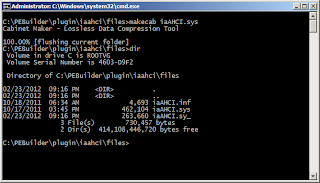
If your PEBuilder directory is C:\PEBuilder, you should have the files iaahci.inf and iaahci.sys under C:\PEBuilder\plugin\iaahci\files. Open a command prompt (as Administrator) and compress iaAHCI.sys via makecab.
Copy the code below and save as a .inf file under C:\PEBuilder\plugin\iaahci directory. If copy-paste doesn't work for you, you can try to copy the code here: http://pastie.org/3437076.
Now try rebuilding BartPE and use it on the laptop of your choice to sysprep the image. You can also use the built BartPE to rescue broken systems.
AHCI was the culprit of my BSOD and having the plugin above I was able to boot into a Windows XP based PE environment to do the cloning.
The next error I faced was the dreaded blue screen of death (BSOD) with stop code 0x0000007B. I knew this was because of the AHCI mode of the SATA drives on the new generation intel chipsets on the laptop. I didn't want to go to WinPE 2.x or the Windows 7 based PE since it is difficult to dissect the innards of the .wim files, and I have working plugins for BartPE.
So I decided to create my own AHCI plugin. I downloaded the floppy image of the drivers from the intel download page. NOTE: Make sure to download the floppy image (filename starts with: f6flpy).
Extract the files inside the floppy image. Only two (2) files are required, namely iastor.inf and iastor.sys. Create a directory named iaahci inside the PEbuilder plug-in directory and copy the files there under directory files. Rename them to iaAHCI.inf and iaAHCI.sys respectively so they will not conflict with other intel RAID drivers.
If your PEBuilder directory is C:\PEBuilder, you should have the files iaahci.inf and iaahci.sys under C:\PEBuilder\plugin\iaahci\files. Open a command prompt (as Administrator) and compress iaAHCI.sys via makecab.

Copy the code below and save as a .inf file under C:\PEBuilder\plugin\iaahci directory. If copy-paste doesn't work for you, you can try to copy the code here: http://pastie.org/3437076.
; PE Builder v3 plug-in INF file
; - plugin for intel mobile ahci drivers
; - by tox (http://www.pimp-my-rig.com)
;

[Version]
Signature="$Windows NT$"

[PEBuilder]
Name="Intel (Mobile) AHCI Drivers"
Enable=1

[SourceDisksFiles]
files\iaAHCI.sy_=4
files\iaAHCI.inf=20

[SetValue]
"txtsetup.sif","SourceDisksFiles","iaAHCI.SY_", "1,,,,,,4_,4,1,,,1,4"
"txtsetup.sif","SourceDisksFiles","iaAHCI.inf", "1,,,,,,,20,0,0"
;(format)HardwareIdsDatabase -- "txtsetup.sif","HardWareIdsDatabase","SCSI\NVIDIA__Raid_Disk_20_____", """nvrd327r"""
"txtsetup.sif","HardWareIdsDatabase","PCI\VEN_8086&DEV_27C1&CC_0106", """iaAHCI"""
"txtsetup.sif","HardWareIdsDatabase","PCI\VEN_8086&DEV_27C5&CC_0106", """iaAHCI"""
"txtsetup.sif","HardWareIdsDatabase","PCI\VEN_8086&DEV_2922&CC_0106", """iaAHCI"""
"txtsetup.sif","HardWareIdsDatabase","PCI\VEN_8086&DEV_2929&CC_0106", """iaAHCI"""
"txtsetup.sif","HardWareIdsDatabase","PCI\VEN_8086&DEV_3A02&CC_0106", """iaAHCI"""
"txtsetup.sif","HardWareIdsDatabase","PCI\VEN_8086&DEV_3A22&CC_0106", """iaAHCI"""
"txtsetup.sif","HardWareIdsDatabase","PCI\VEN_8086&DEV_3B29&CC_0106", """iaAHCI"""
"txtsetup.sif","HardWareIdsDatabase","PCI\VEN_8086&DEV_3B2F&CC_0106", """iaAHCI"""
"txtsetup.sif","HardWareIdsDatabase","PCI\VEN_8086&DEV_3B22&CC_0106", """iaAHCI"""
"txtsetup.sif","HardWareIdsDatabase","PCI\VEN_8086&DEV_1C02&CC_0106", """iaAHCI"""
"txtsetup.sif","HardWareIdsDatabase","PCI\VEN_8086&DEV_1C03&CC_0106", """iaAHCI"""
;(format)SCSI.Load -- "txtsetup.sif","SCSI.Load","ql2200", "ql2200.SY_,4"
"txtsetup.sif","SCSI.Load","iaAHCI", "iaAHCI.SY_,4"
;(format)SCSI -- "txtsetup.sif","SCSI","rr2644", """HighPoint RocketRAID 2644x4 SAS"""
"txtsetup.sif","SCSI","iaAHCI", """Intel(R) Mobile Express Chipset SATA AHCI Controller"""
Now try rebuilding BartPE and use it on the laptop of your choice to sysprep the image. You can also use the built BartPE to rescue broken systems.
AHCI was the culprit of my BSOD and having the plugin above I was able to boot into a Windows XP based PE environment to do the cloning.


