INFO: RHEL Cluster -- Luci Installation Error

I have had the chance of administering and maintaining several implementations of Red Hat Cluster, but I never really had the chance to build one from scratch. So a chance presented itself recently and I bumped into several unforgettable experiences along the way. It roused my inquisitive nature and fruitful learnings were gleaned off the obstacles. One of them was with the initial install of luci (and ricci).

The easiest way to configure a Red Hat Cluster is via luci (and ricci), especially for a RHEL Cluster noob like me. I couldn't argue with that statement. It is easier, although I would love to go a little deeper and understand the command line equivalents of the web based configurations done. So I got to install luci after configuring ricci.

To initialize the luci configuration, I ran this command:
[root@vhost ~]# /usr/bin/paster make-config luci /var/lib/luci/etc/luci.ini --no-default-sysconfig --no-install

However, the result was not as expected. And a configuration file was not created. The errors are below:
[root@vhost ~]# /usr/bin/paster make-config luci /var/lib/luci/etc/luci.ini --no-default-sysconfig --no-install
Distribution already installed:
  luci 0.26.0 from /usr/lib/python2.6/site-packages
Traceback (most recent call last):
  File "/usr/bin/paster", line 9, in 
    load_entry_point('PasteScript==1.7.3', 'console_scripts', 'paster')()
  File "/usr/lib/python2.6/site-packages/paste/script/command.py", line 84, in run
    invoke(command, command_name, options, args[1:])
  File "/usr/lib/python2.6/site-packages/paste/script/command.py", line 123, in invoke
    exit_code = runner.run(args)
  File "/usr/lib/python2.6/site-packages/paste/script/appinstall.py", line 68, in run
    return super(AbstractInstallCommand, self).run(new_args)
  File "/usr/lib/python2.6/site-packages/paste/script/command.py", line 218, in run
    result = self.command()
  File "/usr/lib/python2.6/site-packages/paste/script/appinstall.py", line 295, in command
    self.distro, self.options.ep_group, self.options.ep_name)
  File "/usr/lib/python2.6/site-packages/paste/script/appinstall.py", line 234, in get_installer
    'paste.app_install', ep_name)
  File "/usr/lib/python2.6/site-packages/pkg_resources.py", line 2229, in load_entry_point
    return ep.load()
  File "/usr/lib/python2.6/site-packages/pkg_resources.py", line 1947, in load
    if require: self.require(env, installer)
  File "/usr/lib/python2.6/site-packages/pkg_resources.py", line 1960, in require
    working_set.resolve(self.dist.requires(self.extras),env,installer))
  File "/usr/lib/python2.6/site-packages/pkg_resources.py", line 550, in resolve
    raise VersionConflict(dist,req) # XXX put more info here
pkg_resources.VersionConflict: (WebOb 0.9.6.1 (/usr/lib/python2.6/site-packages), Requirement.parse('WebOb>=0.9.7'))

The "python-webob-0.9.6.1-3.el6.noarch" RPM was properly installed but it looks like the package it is looking for is versions higher. As checked, the python-webob package available is already installed.

I also tried several versions of python-webob packages from several known repositories. Only to fail with the same errors above.

It turns out the "python-repoze-who-friendlyform.noarch" package is in conflict with other repositories. When installing luci, install from the base repository only. Disable EPEL and other enabled repositories.

[root@vhost ~]# yum -y install luci
Loaded plugins: fastestmirror, security
Loading mirror speeds from cached hostfile
Setting up Install Process
Resolving Dependencies
--> Running transaction check
---> Package luci.i686 0:0.26.0-37.el6.centos will be installed
--> Processing Dependency: python-repoze-who-friendlyform for package: luci-0.26.0-37.el6.centos.i686
--> Running transaction check
---> Package python-repoze-who-friendlyform.noarch 0:1.0-0.3.b3.el6 will be installed
--> Finished Dependency Resolution

Dependencies Resolved

============================================================================================================
 Package                                 Arch            Version                        Repository     Size
============================================================================================================
Installing:
 luci                                    i686            0.26.0-37.el6.centos           base          553 k
Installing for dependencies:
 python-repoze-who-friendlyform          noarch          1.0-0.3.b3.el6                 base           13 k

Transaction Summary
============================================================================================================
Install       2 Package(s)

Total download size: 566 k
Installed size: 2.2 M
Downloading Packages:
(1/2): luci-0.26.0-37.el6.centos.i686.rpm                                            | 553 kB     00:00 ... 
(2/2): python-repoze-who-friendlyform-1.0-0.3.b3.el6.noarch.rpm                      |  13 kB     00:00 ... 
------------------------------------------------------------------------------------------------------------
Total                                                                       4.9 MB/s | 566 kB     00:00     
Running rpm_check_debug
Running Transaction Test
Transaction Test Succeeded
Running Transaction

  Installing : python-repoze-who-friendlyform-1.0-0.3.b3. [                                           ] 1/2
  Installing : python-repoze-who-friendlyform-1.0-0.3.b3. [##                                         ] 1/2
  ...
  Installing : python-repoze-who-friendlyform-1.0-0.3.b3. [########################################## ] 1/2
  Installing : python-repoze-who-friendlyform-1.0-0.3.b3.el6.noarch                                     1/2 
  Installing : luci-0.26.0-37.el6.centos.i686 [                                                       ] 2/2
  Installing : luci-0.26.0-37.el6.centos.i686 [#                                                      ] 2/2
  ...
  Installing : luci-0.26.0-37.el6.centos.i686 [###################################################### ] 2/2
  Installing : luci-0.26.0-37.el6.centos.i686                                                           2/2 

  Verifying  : luci-0.26.0-37.el6.centos.i686                                                           1/2 
  Verifying  : python-repoze-who-friendlyform-1.0-0.3.b3.el6.noarch                                     2/2 

Installed:
  luci.i686 0:0.26.0-37.el6.centos                                                                          

Dependency Installed:
  python-repoze-who-friendlyform.noarch 0:1.0-0.3.b3.el6                                                    

Complete!
[root@vhost ~]# /usr/bin/paster make-config luci /var/lib/luci/etc/luci.ini --no-default-sysconfig --no-install
Distribution already installed:
  luci 0.26.0 from /usr/lib/python2.6/site-packages
/usr/lib/python2.6/site-packages/tw/core/view.py:223: DeprecationWarning: object.__new__() takes no parameters
  obj = object.__new__(cls, *args, **kw)
Creating /var/lib/luci/etc/luci.ini
Now you should edit the config files
  /var/lib/luci/etc/luci.ini
[root@vhost ~]# service luci start
Adding following auto-detected host IDs (IP addresses/domain names), corresponding to `host.localdomain' address, to the configuration of self-managed certificate `/var/lib/luci/etc/cacert.config' (you can change them by editing `/var/lib/luci/etc/cacert.config', removing the generated certificate `/var/lib/luci/certs/host.pem' and restarting luci):
(none suitable found, you can still do it manually as mentioned above)

Generating a 2048 bit RSA private key
writing new private key to '/var/lib/luci/certs/host.pem'
[  OK  ]
Start luci...
Point your web browser to https://host.localdomain:8084 (or equivalent) to access luci

So after reinstalling the luci package from the base repo (from the ISO itself), I was able to successfully initialize luci and continue with the cluster configuration.


Share:

INFO: Plants VS Zombies 2 FREE!

Were you addicted to "Plants vs Zombies"? Or are you aware that it even exists? If this is the first time you have heard about it, it's about time as the game is free. The game could be downloaded off the apple store for free!

The screenshot below will tell you that I'm not kidding. It is taken today off of my iPhone. It is not often that this game is offerred for free. Right now the old version of the game is not free and costs US$0.99. Not sure how much the new version will be when it sells.


The game has been installed on my iPhone (screenshot below). I haven't played it yet as I'm excited to let everyone know that the game is free.


So what are you waiting for? Download the game for free and try it out for yourself.


Share:

HOW-TO: Monitor Hard Drive Health

If there is one thing I know for sure as a system administrator -- it is disaster strikes when you least expect it. This is true for just about every aspect of the sysad job. But this is likewise very true for life outside the professional arena. Your computer can have a disaster when you least expect it. This is why it is important to monitor your own computer. And if monitoring is not enough, ensure that it alerts you as well.

I decided to post this article due to a recent experience that saved me from what could have been a potentially big headache. I started noticing my computer freezing at odd times when I'm in the middle of doing something. It irritated me a lot of times but I was just busy finishing up some work to really mind the problem. So I ended up ignoring it to focus on more important things that I need to finish.

Just last week my computer froze and it just simply will not respond for a while. The drive activity LED was flashing indicating a busy drive. I wasn't doing anything so initially, I suspected it to be a virus. Nothing suspicious was running on the task manager and it would happen from time to time -- frequent enough to warrant my attention this time.

I had Acronis Drive Monitor (download here) installed before. I simply stopped it from starting since some startup analyzer suggested I disable it. I decided to run it this time.

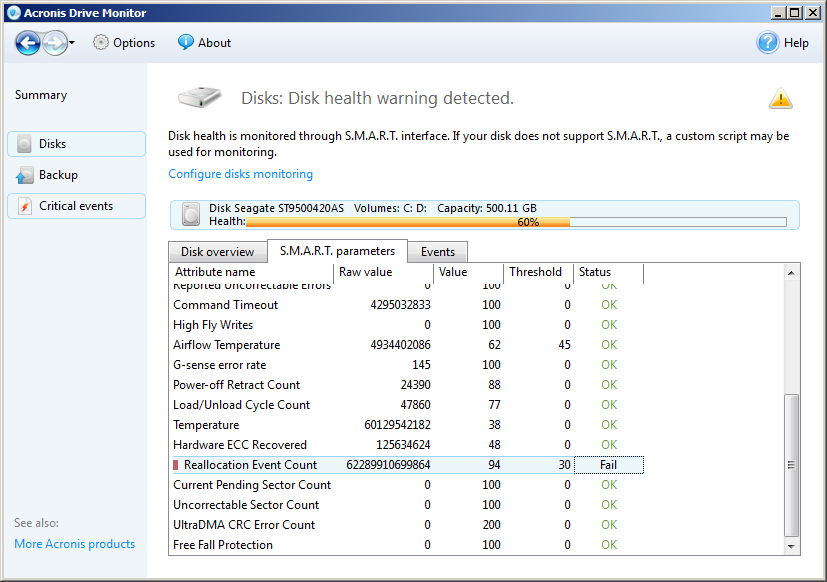
I was a bit surprised at what I saw as the drive monitor alerted that something was critical about the health of my hard drive. The screenshot below has the details.


As you can see from the screenshot, it rated my drive health at 60%. The S.M.A.R.T. attributes of my drive triggered the drive monitor alerting me of the criticality of the situation.

As checked, the "Reallocation Event Count" on my hard drive was through the roof. Further research on this attribute indicated my drive had a lot of bad sectors (thus the reallocation events). And it indicated the imminent failure of the hard drive. The same drive monitor has the S.M.A.R.T. parameters tab. See below.


As seen from the status, it indicated that my drive was failing. So without further ado, I commissioned another drive and copied the contents of the failing drive to it. The drive monitor saved me from a potentially difficult situation. I wasn't much concerned about losing the hard drive, but more of the data in it.

If you have not installed the Acronis Drive Monitor, download the software and install it on your computer. It is freely available from the Acronis website as indicated above. Just let it run in the background and it will alert you of potential problems before they happen. You will not regret using this software.


Share:

HOW-TO: Kill Zombie Processes with Parent ID (PID) of 1

As a system administrator, we are often briefed on the careful use of the "kill" command. Indeed to use this command, you need to know what you're doing.. you really really need to know what you're doing. Seasoned system administrators would often talk about the first time they used this command and the racing heart rate before hitting the execute key.

It's not that bad though. Like all critical things this command could be the "last-resort" tool you need to resolve a complex issue -- in case of fire break glass thing, sort of. But the "kill" command doesn't always work. I'd say about 99% of the time it will. You need to be a seasoned system administrator long enough to encounter this problem as it doesn't come along very often.

I decided to post this solution since last week, I encountered a runaway samba (smbd) process. Samba had to be stopped but instead of it gracefully shutting down, only the parent process did and left behind a lot of child processes. They in turn became zombie processes -- about 257 of them.

It would not have mattered much, but the load on the server increased to match the number of zombie processes. In a matter of seconds, it became a critical problem that need to be dealt with. To illustrate the criticality of the situation, here are a couple of indicators.

[root@vhost ~]# ps -ef | grep smbd | wc -l
257
[root@vhost ~]# uptime
15:18:09 up 95 days,  5:04,  6 users,  load average: 257.91, 257.98, 255.54

When ps is executed, it returned smbd processes that had a parent ID (PID) of 1 -- zombie processes.

[root@vhost ~]# ps -ef | grep smb | tail
nobody   31590     1  0 12:29 ?        00:00:00 smbd -D
nobody   31705     1  0 11:55 ?        00:00:00 smbd -D
nobody   31743     1  0 14:31 ?        00:00:00 smbd -D
nobody   32049     1  0 12:19 ?        00:00:00 smbd -D
nobody   32415     1  0 12:04 ?        00:00:00 smbd -D
nobody   32484     1  0 14:25 ?        00:00:00 smbd -D
nobody   32508     1  0 13:35 ?        00:00:00 smbd -D
nobody   32511     1  0 12:04 ?        00:00:00 smbd -D
nobody   32535     1  0 13:22 ?        00:00:00 smbd -D
nobody   31599     1  0 11:51 ?        00:00:00 smbd -D
[root@vhost ~]# kill -9 31599

Killing any of the smbd processes didn't do much. Server load is holding steady at 257 and none of the smbd processes get terminated.

Once a process becomes a zombie process (or with a PID of 1), there is no amount of "kill" that could terminate it. The only other known way to terminate the zombie process is to do a host reboot. You and I both know this is to be avoided as much as possible.

The other way to do it is not known to many. Only a handful of system administrators that I personally know, knew how to use this command. The command is "telinit". This is the alternative to rebooting the server. To kill the zombie process(es) or processes with PID of 1, execute "telinit u" or "telinit U". Executing the command "telinit u" makes init (the process with ID 1) restart, or as the man pages state it, re-execute, without having to reboot the host.

Once this was done, an immediate impact of decrease in server load was felt. Also, the smbd processes that used to be zombies are now gone.

[root@vhost ~]# uptime
15:21:22 up 95 days,  5:07,  6 users,  load average: 49.06, 184.80, 229.74

About 5 minutes after execution of telinit. The load has re-stabilized.

So if a fellow administrator asks you if you know how to kill a zombie process, let them know that you belong to those handful of seasoned system administrators who don't consider reboot a solution to terminate a zombie process.

I have asked this question in several interviews so far only a few got it right. And I consider it major point in hiring.


Share:

INFO: NetApp iSCSI to VMware Virtual Infrastructure

iSCSI, the implementation of the SCSI protocol over internet packets, is one of the cheapest (if not the cheapest) forms of connectivity to an external storage. It is a form of transmitting data from host to storage, and back, over the IP network. It is cheap since putting up a fiber channel infrastructure will cost more. But nowadays almost every infrastructure already has fiber with 10gigabit connectivity.

iSCSI enables the transmission of SCSI commands over IP-encapsulated packets. This allows organizations to consolidate storage and gain better utilization, not to mention this is easier to manage and backup. The protocol gives hosts an "illusion" that the storage is directly or locally attached to while in reality it sits somewhere else.

The biggest implementation of iSCSI that I have seen so far is its use for disaster recovery (or DR) purposes. On the VMware infrastructure, iSCSI can be utilized where there is a need to share disks or LUNs. And it is easily implemented since most servers nowadays come with adequate number of network interfaces. And it is independent of any physical hardware as long as everything is connected via IP.

The same implementation of NetApp iSCSI is used in the virtual infrastructure that I administer. Everything works after having introduced the LUNs and assigning IP addresses. And it sticks to the notion of keeping everything simple so it is easier to manage. However, during my research of best practice(s) of VMware infrastructure with NetApp storage via iSCSI, a community post in the VMware forums and NetApp community suggested that the NetApp virtual storage console plugin for vSphere needs to be installed.

True enough when the VSC plugin was installed, its interface showed alerts on the screen. Below is a screenshot of what it looks like.


Apparently, although it works after configuration, the settings are not that optimal. It needs further tweaking and the VSC interface itself can tweak the settings for optimal multipath settings, optimal active-active configuration, failover settings, etc.


Correcting or applying the right settings to the current environment is easy. It all it takes is to right click the alert icon and select "Set Recommended Values..".


It will then ask which of the recommended values are applied. All the needed options are ticket by default. The interface also displays what settings it changes.


When the recommended values are applied, the interface immediately changes from "Alert!" to "Normal". But reboot is still required as shown on the Status where it says "Pending Reboot".

After rebooting the ESXi host, the optimal settings are applied. The VSC interface on the vSphere Client application window confirms this.

To ensure that the guest machines are not impacted by the change, it is recommended to put the ESXi host in maintenance mode. It is easy to do since vMotion is there to ensure no downtime is incurred. This is the same route I applied. It also allows you to immediately reboot after applying the resolutions suggested by the virtual storage console.

After applying the tweaks, you will notice faster access to the storage infrastructure from the guest machines. If you have a similar infrastructure, install the VSC plugin and the benefits pay off immediately.

Share:

Subscribe for Latest Update

Popular Posts

Post Labels

100gb (1) acceleration (1) acrobat (1) adblock (1) advanced (1) ahci (1) airdrop (2) aix (14) angry birds (1) article (21) aster (1) audiodg.exe (1) automatic (2) autorun.inf (1) bartpe (1) battery (2) bigboss (1) binance (1) biometrics (1) bitcoin (3) blackberry (1) book (1) boot-repair (2) calendar (1) ccleaner (3) chrome (5) cloud (1) cluster (1) compatibility (3) CPAN (1) crypto (3) cydia (1) data (3) ddos (1) disable (1) discount (1) DLNA (1) dmidecode (1) dns (7) dracut (1) driver (1) error (10) esxi5 (2) excel (1) facebook (1) faq (36) faucet (1) firefox (17) firewall (2) flash (5) free (3) fun (1) gadgets (4) games (1) garmin (5) gmail (3) google (4) google+ (2) gps (5) grub (2) guide (1) hardware (6) how (1) how-to (45) huawei (1) icloud (1) info (4) iphone (7) IPMP (2) IPV6 (1) iscsi (1) jailbreak (1) java (3) kodi (1) linux (28) locate (1) lshw (1) luci (1) mafia wars (1) malware (1) mapsource (1) memory (2) mikrotik (5) missing (1) mods (10) mouse (1) multipath (1) multitasking (1) NAT (1) netapp (1) nouveau (1) nvidia (1) osmc (1) outlook (2) p2v (2) patch (1) performance (19) perl (1) philippines (1) php (1) pimp-my-rig (9) pldthomedsl (1) plugin (1) popcorn hour (10) power shell (1) process (1) proxy (2) pyspark (1) python (13) qos (1) raspberry pi (7) readyboost (2) reboot (2) recall (1) recovery mode (1) registry (2) rename (1) repository (1) rescue mode (1) review (15) right-click (1) RSS (2) s3cmd (1) salary (1) sanity check (1) security (15) sendmail (1) sickgear (3) software (10) solaris (17) squid (3) SSD (3) SSH (9) swap (1) tip (4) tips (42) top list (3) torrent (5) transmission (1) treewalk (2) tunnel (1) tweak (4) tweaks (41) ubuntu (4) udemy (6) unknown device (1) updates (12) upgrade (1) usb (12) utf8 (1) utility (2) V2V (1) virtual machine (4) VirtualBox (1) vmware (14) vsphere (1) wannacry (1) wifi (4) windows (54) winpe (2) xymon (1) yum (1) zombie (1)

RANDOM POSTS